
Tape hysteresis emulator
Hysterical
Tape saturation with memory — frequency-dependent, history-dependent, and light enough to sit on every channel of a session rather than one bus.
- Zero latency
- VST3 · AU · CLAP · Standalone
- macOS · Windows
v0.51 — in beta with testers
Get on the release listWhat it does
A tape emulator that sits on a track or a bus and does what you actually want from tape: rounds transients without dulling them, thickens the low end, and glues a group together as you push into it.
Why it sounds the way it does
A plain waveshaper maps one input level to one output level, always. Hysterical doesn't: before it's saturated, the signal is measured against a slower-moving copy of itself, so what the curve sees depends on what came immediately before it.
Two consequences you can hear:
- It's level- and history-dependent. The same transient hits differently depending on its context. That's the part that reads as "responsive" rather than "processed."
- It's frequency-dependent. Transient content is softened before saturation rather than after, so the harmonics change character with content instead of staying in fixed proportion.
To be precise about what this is: a fast mathematical model — one smoothing filter into a saturator, tuned by ear until it behaved the way tape behaves. It is not a physical model of magnetisation — it doesn't solve the Jiles–Atherton equations and isn't trying to. If you want the physics, the free Chow Tape Model is an excellent implementation of exactly that, and it's open source.
Hysteresis amount:
- None
- Low
- Medium
- High
The interface
The panel is the signal path, drawn left to right. Input, an optional band split, the driven high band in coral and the clean low band in teal, then balance and output. Anything the plugin sets for you rather than you setting it is amber.
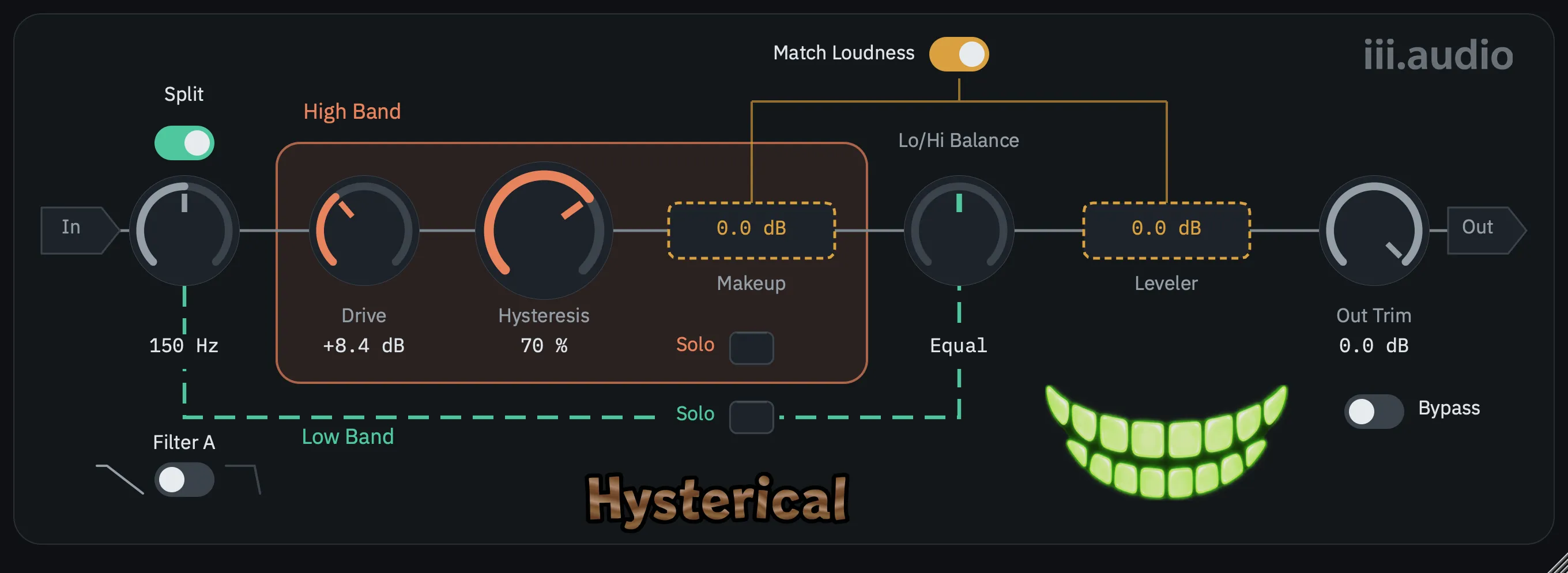
Easy on your CPU
Designed from the ground up to be efficient rather than optimised after the fact — and it reports zero latency. No lookahead, no oversampling, no delay lines: nothing in the signal path that shifts anything in time, so it needs no delay compensation and can sit anywhere in a chain.
Zero latency isn't the same as phase-flat. The band split and the smoothing stage both rotate phase — that's not a side effect, it's where the behaviour comes from.
The headroom isn't clever optimisation — it's doing less. A one-pole filter and one waveshaper, with no iterative solver and no oversampling to pay for.
What that buys is where you can put it. This goes on every channel of a session, not on one bus at the end of it. Tape on forty tracks is a different mixing decision than tape on the master, and it's a decision most tape plugins price you out of making.
Under the hood
It stays level while you drive it
Match Loudness is on by default: push the drive and the plugin compensates behind you, using a loudness measurement rather than a peak reading. Bypass it and the level doesn't jump, so when you A/B you're hearing what the saturation did to the sound — not just that it got louder.
Two crossover shapes
The gentle one splits at 12 dB/oct and recombines perfectly, so the saturation bleeds across the crossover instead of stopping at it — the bands stay of a piece, which is usually what you want on a full mix. The steep one splits at 24 dB/oct and holds them properly apart: lean on the top end and the low stays out of it, so a kick keeps its shape while everything above it gets worked. Same knobs, two quite different ways to sculpt.
A window you can actually resize
Drag it anywhere from 510 to 1360 pixels wide — small enough to tuck beside a mixer, large enough to work on. The aspect ratio is locked so nothing distorts, and the panel is drawn as vector at whatever size you pick, so it stays sharp instead of turning into a stretched bitmap.
Formats
VST3, AU, CLAP, and a standalone app.
Get on the release list
If you want it when it lands, get on the list — that's the only thing the list is used for.